Acebyte > Acebyte Utilities >Uninstall Manager


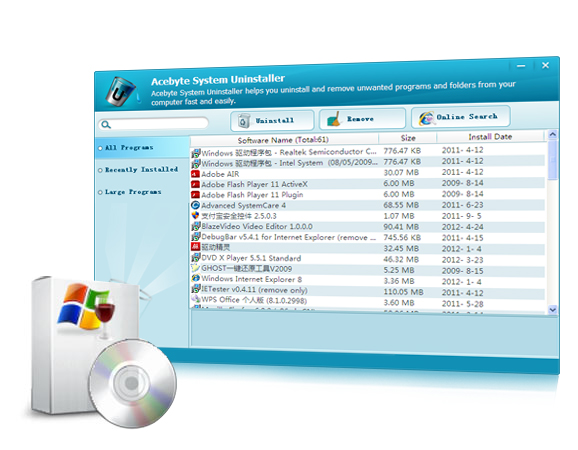
- Is your computer fast enough? Want to free up disk space to maximize your PC speed? The Uninstall Manager is the right assistant for you. An Uninstall Manager is a program designed to help you manage Windows software packages. It displays an alphabetical list of all programs, games and tools that have added an uninstall entry to Windows registry. You can enter an entry to view more information about the program.
Quick Access to Installed Programs and Safe Uninstallation of Unwanted Programs
- Show the list of installed program faster than control panel
- Online search selected program
- Delete single entry from the registry by clicking "Remove"
- Searching and filtering of uninstallation entries in the filter box
- Show programs by "All Programs", "Recently Installed", and "Large Programs"
- The sort order can also be changed to any of other displayed attributes
Advantages
- Program name
- Program size
- Program version
- Install date
- Publisher
- Support information
Displayed Attributes
Know More
- >>System Care
- >>Privacy Protect
- >>Turbo Boost
- >>Internet Clean
- >>Memory Manager
- >>Startup Manager
- >>Disk Defragment
- >>Registry Cleaner
- >>Registry Defrag
- >>Disk Cleaner
- >>Shortcut Cleaner
- >>Undelete
- >>Unlocker
- >>File Shredder
- >>File Encryption
- >>Cloned File Finder
- >>File Splitter
- >>Empty Folder Finder
- >>Top File Finder
- >>Uninstall Manager
- >>Disk Check
- >>Process Manager
- >>Context Menu Fixer
- >>Driver Backup
- >>Shutdown Scheduler
Acebyte Utilities
Register Cleaner
Useful Links
Hot Tags
Acebyte | Affiliate & Partners | Links | Sitemap | Privacy | Terms of Use | Contact us
Copyright © Acebyte. All rights reserved
Copyright © Acebyte. All rights reserved